


Termius - Modern SSH Client
4.72.48K Reviews
App Specs
- Version
- 7.8.2
- Updated On
- License
- Free
- Downloads
- 1,000,000+
- Developer
- Termius Corporation
- Categories
- Business
- Platform
- Android, iOS
Screenshots
 Analysis by AppCompare
Picture this: You're on the go, juggling multiple SSH connections, and you desperately need a sleek, efficient way to manage them all. Enter Termius - Modern SSH Client. I've been diving deep into this app, and let me tell you, it's like having a command center right in your pocket.
Where connection setup can get sticky
The first snag with any mobile terminal is often not the terminal itself but the details entered before a session begins. A hostname copied with an extra space, an outdated address, or a username that differs from the one used on a laptop can all make a valid server seem unreachable. I check those basics before changing settings: confirm the host, account name, and port against the details I already use elsewhere, then try again with one variable changed at a time.
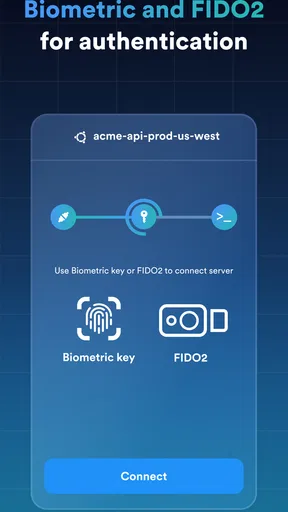
Authentication can also feel less straightforward on a phone because keys, passwords, and passphrases are easy to confuse. If a key-based connection fails, I first make sure I selected the intended key and that the matching public key is accepted by the remote account. If I use a passphrase, I enter it carefully rather than repeatedly guessing. This simple order helps separate a credential problem from a network problem.
Small checks before the first session
Before relying on a mobile connection during an urgent task, I test it while I have time to troubleshoot. I save a connection using the same host details I trust on my computer, open a harmless session, and run a basic command that confirms I reached the expected machine. I avoid making a consequential change just to test the terminal. That first low-risk check is useful because it verifies both the connection and my familiarity with typing on a smaller screen.
Termius is a free business app from Termius Corporation, with a 4.6 average from around 40,000 ratings and more than a million installs. It is rated for Everyone, and its current version is 7.5.0. The app has been available since February 19, 2014, and includes in-app purchases ranging from $0.99 to $120 per item. I like that the basic download gives people a way to try a mobile SSH workflow, but I would check which features matter to me before paying for anything. A free starting point does not mean every capability or convenience will necessarily be included without a purchase.
Simplifying SSH Like Never Before
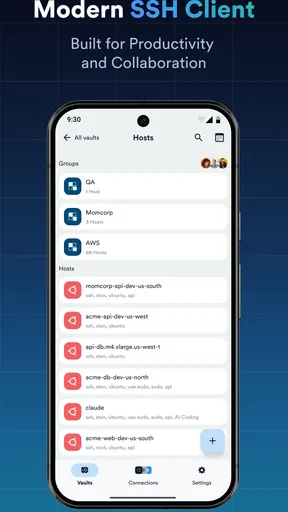
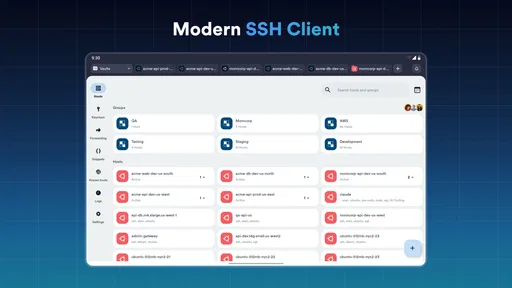
First things first, let's talk about the interface. Termius nails it with its clean and intuitive design. Whether you're a seasoned network engineer or just getting your feet wet, you'll feel right at home with its minimalistic layout. The app greets you with a dashboard that makes accessing your connections a breeze. No more fumbling through tabs and menus; everything you need is right there, neatly organized.
All Your Devices, One Place
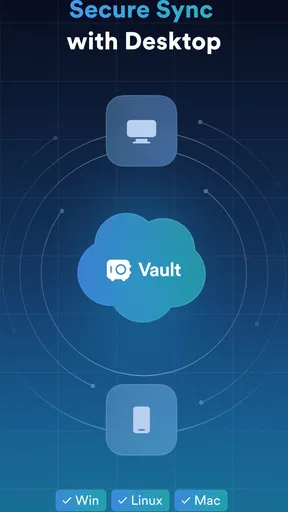
One of the standout features is its ability to sync across multiple devices. You're not tethered to your desk; you can start a session on your desktop and continue it on your phone or tablet without missing a beat. This seamless transition is a game-changer for anyone who's constantly on the move.
Worth Reading Before You Choose

EA SPORTS FC Mobile 26 Is a Bigger Football Game, but It Takes Time

Flipboard Shows What News Apps Must Do Beyond the Feed

Switching to Android Auto Means Rethinking Your Driving Routine

Google Calendar Makes a Crowded Week Easier to Manage

Ludo King Makes the Most of the Minutes Between Plans

Baby Panda World Brings Quick Play to Modern Phones, but Its Game Library Feels Busy
Setting up your connections is a walk in the park. You can import your existing SSH keys or generate new ones right within the app. It supports a variety of protocols, so whether you're connecting via SSH, Telnet, or Mosh, Termius has got you covered.
Recovering a workflow when something goes wrong
A connection that worked yesterday can fail today for reasons that have nothing to do with the app. When that happens, I avoid deleting the saved host or rebuilding every detail immediately. I first check whether the same machine is reachable through a trusted alternative connection, such as my usual computer or another network I control. If it works there, I compare the saved connection details and authentication choices on the phone. If it fails everywhere, I stop changing the mobile setup and investigate the server or network instead.
For a session that drops during a task, I treat the terminal as a view into the remote machine, not as proof that a command completed. I reconnect and inspect the system’s current state before repeating anything that could make a change twice. That is especially important for deployments, file operations, or commands that create or delete resources. A dropped screen can leave the outcome uncertain; checking first is safer than assuming the command either succeeded or failed.
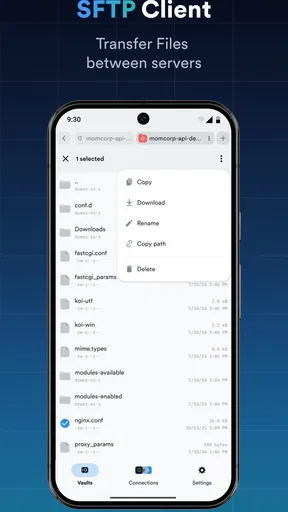
When I need a file as well as a shell, having SFTP alongside terminal access can reduce app switching. I still keep the two jobs distinct: use the terminal to inspect and control the remote environment, and use file transfer for the specific files I intend to move. For a small configuration edit, I verify the destination and keep a local copy of the original before replacing anything. This is a practical habit, not a substitute for a proper backup.
Security That Doesn’t Sleep
Security is a big deal, and this app takes it seriously. With end-to-end encryption, your data is safe from prying eyes. Plus, it offers two-factor authentication, adding an extra layer of protection. You can sleep easy knowing your connections are secure.
Making mobile terminal work less error-prone
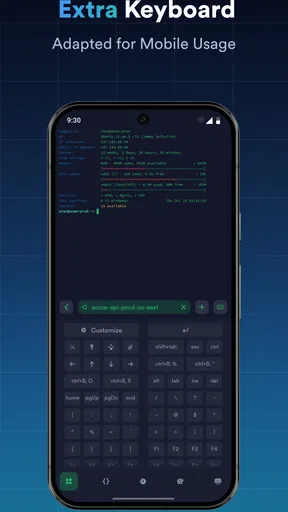
A phone is convenient for a quick check, but it is not automatically the best place for a long command session. I use a compact Bluetooth keyboard when I expect to type more than a few commands, and I keep commands short when working directly on a touchscreen. Before sending anything destructive, I reread the full line; a misplaced character or an unintended tap matters more at a small screen size.
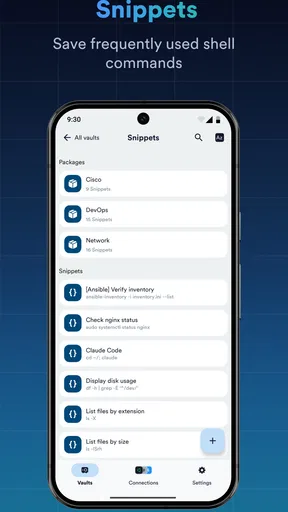
Reusable snippets can help with routine commands, but I would treat them like saved tools rather than magic buttons. A command that is safe on a test host may be risky on production, so I review the target and arguments before running a saved line. A good pattern is to keep a harmless inspection command separate from the command that changes state. This reduces the chance of running the wrong operation just because it is familiar.
Port forwarding is another feature with a learning curve. It can make a service reachable through a tunnel without exposing it in the same way as a direct public connection, but the local and remote endpoints still need to be chosen correctly. I write down what I am trying to reach and which side should listen before configuring a tunnel. If I only need a one-off connection and do not understand the routing involved, I would rather use a simpler approved route than guess at forwarding settings.
Commanding Command Line Features
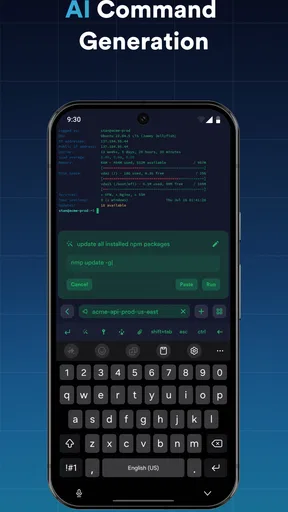
But what about the command line experience? Well, it’s pretty stellar. The app supports snippets, which are reusable pieces of code you can execute with a simple tap. This feature is a lifesaver for repetitive tasks, saving you time and ensuring consistency. There's also a terminal theme editor, allowing you to customize your terminal’s appearance to suit your style. Why not work in an environment that feels uniquely yours?
Another nifty addition is the port forwarding capabilities. Whether you need local, remote, or dynamic port forwarding, the app handles it all with ease. It’s like having a Swiss army knife for your networking needs.
How it compares with the usual alternatives
Compared with keeping separate SSH apps, file-transfer tools, and handwritten host notes, Termius can make a mobile workflow feel more consolidated. SSH is the natural choice for routine secure administration; Telnet and Mosh are useful only when the remote environment and network conditions call for them. Having several connection methods in one place is convenient, but it does not make those protocols interchangeable or remove the need to choose the right one for a particular server.
A desktop terminal is still the better choice for long sessions, complex scripts, or work that depends on a full keyboard and several windows. A basic terminal app may be preferable if all I need is a single occasional SSH connection and I do not care about organizing a collection of hosts. Termius makes the most sense when I repeatedly move between known machines and value having connection details and terminal access gathered in one mobile workspace.
Who benefits most, and who may want less
I would recommend it to developers, administrators, and technically curious users who already understand the basics of remote access and want a practical way to check or manage systems away from a desk. It also suits someone who handles a small set of recurring tasks: inspect service status, review logs, or confirm that a machine responds. The app’s usefulness grows with a well-organized set of trusted connections, not simply with the number of protocols on its feature list.
I would steer a complete beginner away from using it as a substitute for learning what a shell command does. A clean interface can make access easier, but it cannot prevent a risky command from changing the wrong system. Likewise, if you rarely connect remotely, prefer a large desktop workspace, or need to do extensive file management, a computer-based setup or a dedicated file workflow may be more comfortable.
Community and Support
Behind every great app is a community that supports it. Termius has an active user base and a responsive support team. Whether you're facing a glitch or just have a question, help is always a click away. It’s reassuring to know that you're not alone on this tech journey.
Getting Started with Termius
If you're ready to jump in, downloading the app is straightforward. Available on both Android and iOS, it's just a quick search away in your app store. Once downloaded, the setup wizard guides you through configuring your first connection. It's user-friendly and perfect for those who might not be SSH wizards yet.
A realistic day-to-day test
Imagine I am away from my desk when a colleague asks whether a small service is responding. I open the saved host, connect, and check its status rather than trying to rebuild the whole workstation on my phone. If I need to inspect a log or confirm a process, a short session is a sensible use of mobile SSH. If the service needs a complicated repair, I can use the phone to establish what is happening, then move to a computer for careful investigation. That division keeps the app useful without pretending a phone is a replacement for every admin task.
People often wonder whether they need to buy anything to try it. The app is free to download, while in-app purchases are available; I would decide based on the particular features I expect to use rather than assuming every workflow is covered at no cost. Another practical question is whether it is suitable for someone new to SSH. The guided start can make the first connection less intimidating, but users still need valid server details and a basic sense of what commands do. For device compatibility, the minimum operating system is Android 8.0, so I would check that before planning to use it on an older Android device.
Final Thoughts
In conclusion, Termius - Modern SSH Client is a must-have for anyone who needs to manage SSH connections efficiently. Its seamless syncing, robust security features, and user-friendly interface make it stand out in a crowded app market. Whether you're a tech enthusiast or a professional, this app is designed to make your life easier. So go ahead, give it a whirl, and experience the future of SSH management.
Ready to take control of your connections? Download Termius today and revolutionize your workflow!
My practical verdict
My strongest reason to choose this app is convenience: it brings remote terminal access and related connection workflows into a mobile app that is approachable enough for quick checks. My main caution is that convenience can encourage rushed administration. I would save trusted hosts carefully, test the setup before an urgent moment, and treat every command as consequential even when it takes only a tap to run.
For someone who regularly manages remote machines, the combination of SSH, SFTP, Telnet, and Mosh gives Termius a broader role than a bare terminal, while the clean layout helps keep routine access manageable. For occasional users, beginners without guidance, or anyone expecting a phone to replace a full workstation, the learning curve and small-screen limits may outweigh that convenience. I would try the free app for a low-risk task, see whether its organization fits my habits, and only then decide whether any in-app purchase is worthwhile.
Pros
- User-friendly interface for easy navigation.
- Supports multiple platforms and devices.
- Advanced security with end-to-end encryption.
- Customizable terminal for personalized setups.
- Syncs data across all devices seamlessly.
Cons
- Limited features in the free version.
- Occasional connectivity issues reported.
- Can be resource-intensive on older devices.
- Requires subscription for full functionality.
- No offline mode for some features.
FAQs for Termius - Modern SSH Client
What platforms does Termius support?
Termius is available on multiple platforms, including Android, iOS, Windows, macOS, and Linux. This cross-platform availability ensures that users can seamlessly manage their SSH connections across different devices, making it an ideal choice for professionals who require flexibility and mobility in their work environment.
Is Termius secure for remote connections?
Yes, Termius is designed with security as a priority. It supports end-to-end encryption, ensuring that your data is protected during remote connections. Additionally, it offers features like two-factor authentication and supports SSH keys for a more secure login process, providing peace of mind for sensitive operations.
Does Termius offer a free version?
Termius offers both free and premium versions. The free version includes basic SSH client functionalities, while the premium version, known as Termius Pro, provides additional features such as SFTP support, terminal tabs, and cross-device synchronization. Users can choose based on their specific needs and budget.
Can I use Termius offline?
Yes, Termius can be used offline for managing saved hosts and accessing terminal logs. However, for establishing new SSH connections, an internet connection is necessary. This offline capability ensures that users can still perform certain tasks even without immediate access to a network.
How user-friendly is Termius for beginners?
Termius is known for its clean and intuitive interface, which makes it accessible for beginners. It offers a user-friendly experience with features like auto-completion and quick command access. Additionally, the app provides comprehensive documentation and support to help new users get started and make the most of its capabilities.


